tmux plugin
Every session, window, and pane. One tree.
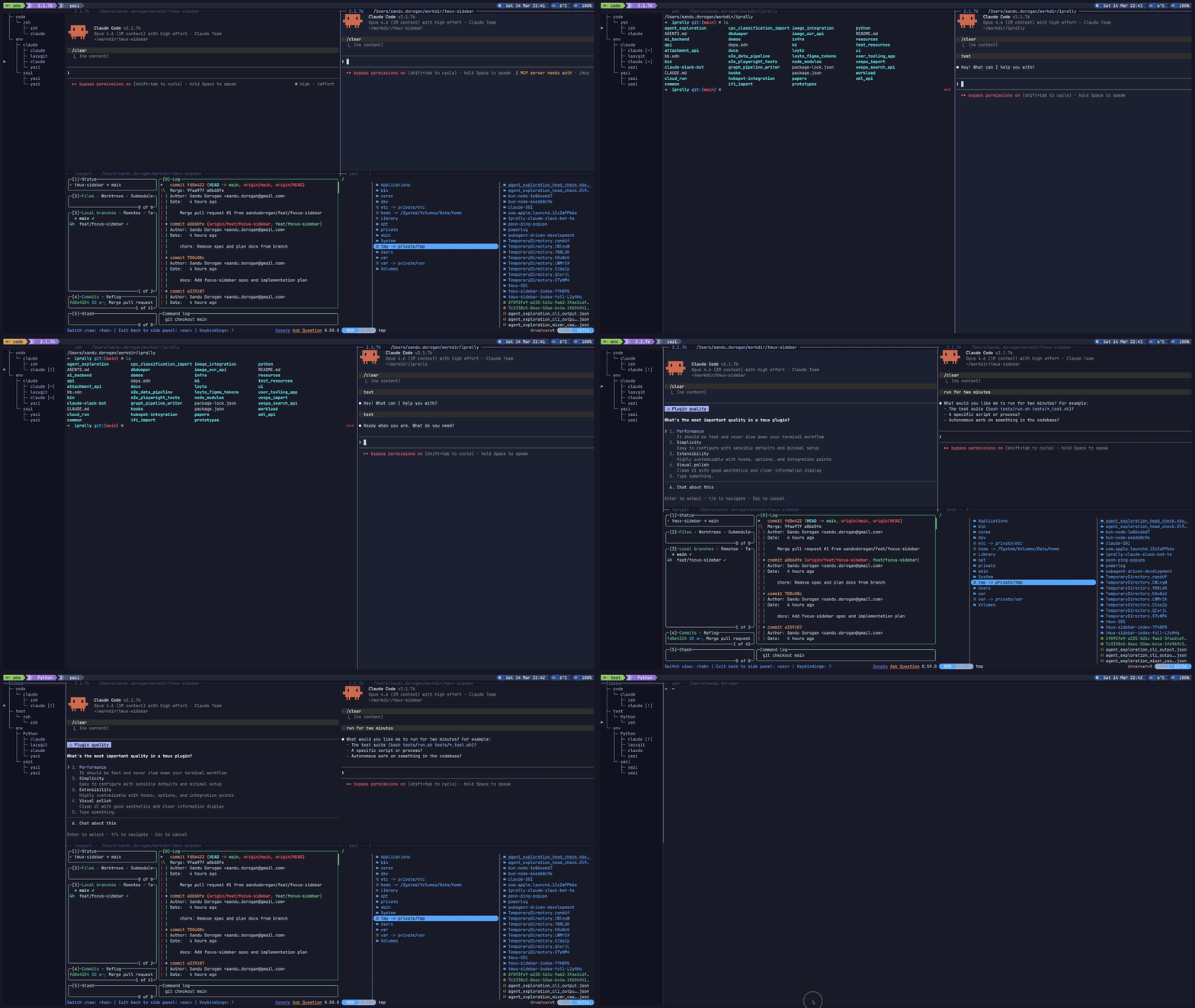
A persistent sidebar on the left of every tmux window. It shows your whole server as a tree and tells you which AI agents are working, waiting on you, or done.
├─ What it does
-
Tree view
Sessions, windows, and panes as a Unicode tree. Enter jumps to any pane. The tree redraws as panes come and go.
-
Live agent badges
Hook scripts write a state file per pane. The sidebar reads it and shows a badge. needs-input clears when you focus the pane.
⏳ running ↳⏳ subagent ❓ needs input ✅ done ❌ error -
Follows you
Open it once. The sidebar appears in every window of the session and stays in place as you switch.
-
Pane icons
Per-app glyphs for shells, agents, lazygit, yazi, vim, ssh, and more. Picks Nerd Font glyphs when one is installed, ASCII otherwise.
-
Manage from the sidebar
Add and rename windows and sessions, close panes. New items land next to the selected row.
-
Filter and jump list
Show only panes that match a list of commands with f. Walk back through visited panes with Ctrl+o and forward with Ctrl+i.
-
Context menus
Right-click or press m on any row for rename, close, and reorder actions.
-
Yours to configure
Width, colors, badges, icon theme, and every shortcut are tmux options. Bad shortcut sets fall back to defaults.
├─ Install
Requires tmux 3.0+, Python 3, and bash 4.0+.
# ~/.tmux.conf
set -g @plugin 'sandudorogan/tmux-pane-tree'
set -g @tmux_pane_tree_install_agent_hooks 1   # optional: wire agent hooks on load
Reload tmux, then prefix I.
git clone https://github.com/sandudorogan/tmux-pane-tree \
  ~/.config/tmux/plugins/tmux-pane-tree

# ~/.tmux.conf
source-file ~/.config/tmux/plugins/tmux-pane-tree/tmux-pane-tree.conf
Then tmux source-file ~/.tmux.conf and prefix t.
├─ Keys
From any pane
| prefix t | Toggle the sidebar |
| prefix T | Focus the sidebar, or return to the main pane |
Move
| j k | Move selection, arrows work too |
| gg G | Top, bottom |
| Ctrl+o Ctrl+i | Jump list back, forward |
| Enter | Jump to the selected pane |
| Ctrl+l | Return focus to the main pane |
| q | Close the sidebar |
Manage
| aw as | Add window, add session |
| rw rs | Rename window, rename session |
| x | Close the selected pane |
| m | Open the context menu |
| f | Toggle the pane filter |
| p | Toggle hide-panes mode |
Closing the last pane removes its window. Closing the last window removes its session. The jump list starts from the pane you came from and resets when the sidebar loses focus.
├─ Config
Set options with set -g in your tmux config. Unset colors derive from your tmux theme.
| Option | Default | Does |
|---|---|---|
@tmux_pane_tree_width | 25 | Sidebar column width |
@tmux_pane_tree_focus_on_open | 1 | Focus the sidebar when toggled open |
@tmux_pane_tree_toggle_key | t | Prefix key to toggle |
@tmux_pane_tree_focus_key | T | Prefix key to focus |
@tmux_pane_tree_session_order | — | Comma-separated session order, rest follow |
@tmux_pane_tree_filter | — | Comma-separated pane filter, matched against command, title, and agent |
@tmux_pane_tree_hide_panes | off | Show only sessions and windows |
@tmux_pane_tree_scrolloff | 8 | Rows kept visible around the cursor, 0 off |
@tmux_pane_tree_icon_theme | auto | auto, ascii, unicode, or nerdfont |
@tmux_pane_tree_icon_<app> | — | Override one app icon |
@tmux_pane_tree_badge_<status> | — | Override one status badge |
@tmux_pane_tree_color_session | — | Session name color, hex |
@tmux_pane_tree_color_window | — | Window name color, hex |
@tmux_pane_tree_color_pane | — | Pane name color, hex |
@tmux_pane_tree_install_agent_hooks | 0 | Install agent hooks when the plugin loads |
@tmux_pane_tree_<action>_shortcut | — | Override a sidebar shortcut |
Shortcuts
Actions: add_window, add_session, go_top, go_bottom,
jump_back, jump_forward, rename_window, rename_session,
toggle_filter, close_pane. If any shortcut is empty, duplicated, a prefix of
another, or uses q, all ten revert to defaults.
set -g @tmux_pane_tree_close_pane_shortcut dd
set -g @tmux_pane_tree_filter "claude,codex,cursor,opencode"
Icons
auto picks nerdfont when a Nerd Font is installed on the tmux host, else
ascii. If glyphs render wrong, or the session is remote, set the theme explicitly.
Badges follow the theme.
set -g @tmux_pane_tree_icon_theme ascii
set -g @tmux_pane_tree_icon_claude "A"
set -g @tmux_pane_tree_badge_running "*"
Environment
TMUX_PANE_TREE_STATE_DIR | State directory, default $XDG_STATE_HOME/tmux-sidebar |
TMUX_PANE_TREE_PLUGIN_DIR | Plugin root used by the example hooks |
TMUX_PANE_TREE_FONT_DIRS | Path-separated font directories checked by icon theme auto |
└─ Agent hooks
agent hook ──▶ scripts/features/hooks/hook-<agent>.sh
                      │
                      ▼
           update-pane-state.sh --pane $TMUX_PANE --app claude --status running
                      │
                      ▼
           $STATE_DIR/pane-%N.json ──▶ sidebar badge
The installer writes the wiring for every agent and keeps three
timestamped backups per file. Run it on load with
@tmux_pane_tree_install_agent_hooks 1, or by hand:
bash ~/.config/tmux/plugins/tmux-pane-tree/scripts/features/hooks/install-agent-hooks.sh| Claude | ~/.claude/settings.json |
| Codex | ~/.codex/config.toml, the notify line |
| Cursor | ~/.cursor/hooks.json |
| OpenCode | ~/.config/opencode/plugins/tmux-pane-tree.js |
| Pi | ~/.pi/agent/extensions/tmux-pane-tree.ts |
| Kiro | ~/.kiro/agents/tmux-pane-tree.json, ~/.kiro/settings/cli.json |
Subagent completions are suppressed so only the parent session shows
✅. To wire hooks by hand, copy from examples/ and
point each tool at its wrapper under scripts/features/hooks/.